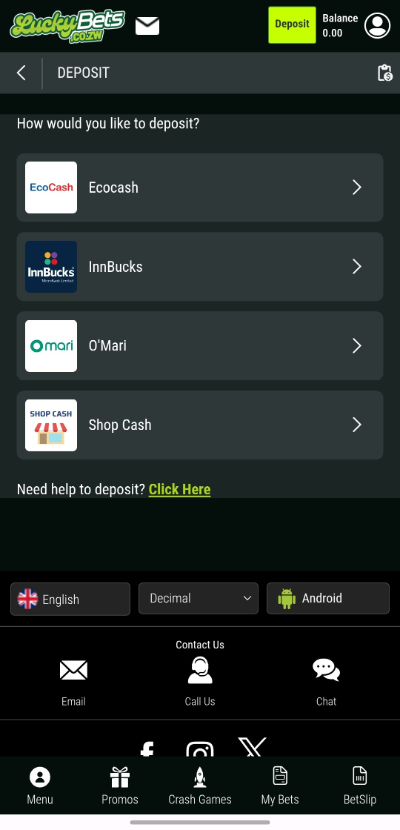
LuckyBets takes deposits from EcoCash, InnBucks, O’Mari and Shop Cash, all from $5. LuckyBets doesn’t charge deposit fees, and withdrawals go back to the method you deposited with.
Below is each method, the limits, what to do step by step and how to fix a deposit that doesn’t show up.
LuckyBets payment methods at a glance
| Method | Deposit | Withdraw | Good to know |
|---|---|---|---|
| EcoCash | $5 to $1,000 | Yes | Approve with your EcoCash PIN |
| InnBucks | $5 to $500 | Yes | InnBucks adds its own 3.25% fee |
| O’Mari | $5 to $500 | Yes | Confirm with an SMS code (OTP) |
| Shop Cash | From $5 | Yes | Pay cash at an authorised LuckyBets shop |
Some advice: Withdrawals normally go back to the method you deposited with. If you want to cash out with InnBucks, deposit with InnBucks too.
How to deposit with EcoCash
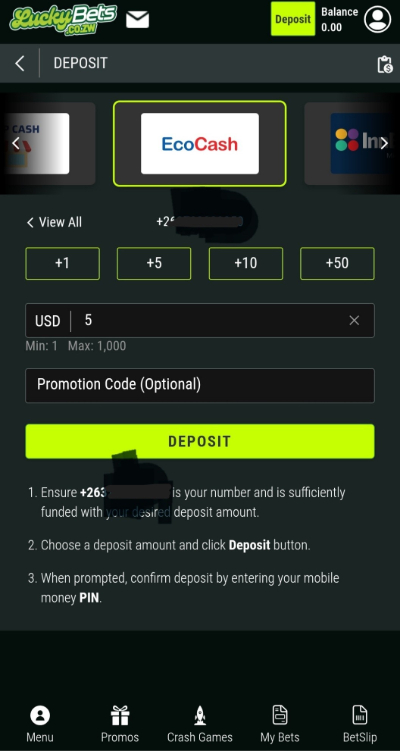
- Log in and tap Deposit at the top.
- Choose EcoCash. Your registered number is shown.
- Type the amount in USD and tap Deposit.
- Enter your EcoCash PIN in the prompt on your phone. The money shows in your balance straight away.
Example: You want to play with $10, which is above the $5 minimum. Type 10, tap Deposit, then enter your 4-digit EcoCash PIN when your phone asks. Check that USD is selected, because a ZiG payment won’t top up your USD balance.
How to deposit with InnBucks or O’Mari
- Tap Deposit and choose InnBucks or O’Mari.
- Enter the amount.
- InnBucks: approve in the InnBucks app with your PIN, by USSD or by scanning the QR code. O’Mari: enter the code sent to you by SMS.
Example: To deposit $20 with InnBucks, keep at least $20.65 in your InnBucks wallet. InnBucks takes 3.25%, which is $0.65, on top of the deposit.
How to deposit with Shop Cash
- Find your Player ID in My Profile.
- Go to an authorised LuckyBets shop, such as 13 Hogerty Hill Shopping Centre in Harare.
- Give your Player ID and pay the cash. You get a receipt with a transfer code.
- Open Deposit, choose Shop Cash and enter the code.
How to withdraw from LuckyBets
- Open your account menu and choose Withdraw.
- Pick the method you deposited with.
- Enter the amount and confirm. Check the number is yours.
Upload your ID before your first withdrawal. LuckyBets checks it before paying out, so doing it early saves a delay.
Deposit not showing? What to do
| What happens | Why | What to do |
|---|---|---|
| Money left your wallet but not in LuckyBets | Network delay | Refresh after a few minutes, then send support the payment reference |
| InnBucks deposit fails | The 3.25% fee isn’t covered | Keep a little more than the deposit in your wallet |
| Deposit blocked | Outside the method’s limits | Deposit at least $5, and no more than $1,000 for EcoCash or $500 for InnBucks and O’Mari |
| PIN prompt timed out | You didn’t approve in time | Start a new deposit and approve quickly |
Some advice: Screenshot every deposit confirmation. If a payment doesn’t arrive, support can trace it from the reference.
New to LuckyBets? Your first deposit unlocks up to 80 Aviator Free Flights. See our LuckyBets bonus guide and EcoCash deposit walkthrough.
FAQs
🧾 Does LuckyBets charge deposit fees?
LuckyBets doesn’t, but InnBucks adds its own 3.25% fee on top. Keep a little extra in your wallet so the deposit goes through. To deposit $20 with InnBucks, for example, you’d need $20.65. If the fee isn’t covered, the payment fails.
🔁 Can I withdraw to a different method?
Normally not. Withdrawals go back to the method you deposited with, so it pays to plan ahead. If you want to cash out to InnBucks, deposit with InnBucks in the first place.
It’s also worth uploading your ID before your first withdrawal. LuckyBets checks it before paying out, and doing it early saves you a wait.
🏪 Where can I deposit cash?
At an authorised LuckyBets shop, such as the one at 13 Hogerty Hill Shopping Centre in Harare. Give the cashier your Player ID, which you’ll find in My Profile, and pay the cash. Your receipt has a transfer code, which you enter under Shop Cash in the Deposit screen to add the money to your account.
📲 How does an O’Mari deposit work?
Choose O’Mari in Deposit, enter an amount between $5 and $500, then confirm with the one-time code O’Mari sends you by SMS. Have your phone nearby, because the code needs to go in quickly.
💱 Why didn’t my EcoCash deposit top up my balance?
Check the currency first. Type the amount in USD and make sure USD is selected, because a ZiG payment won’t top up a USD balance. If the currency was right, give it a few minutes and refresh, then send support the payment reference if it still isn’t there. Screenshotting every deposit confirmation makes that much easier.