MWOS accepts EcoCash and InnBucks online, from $1, and doesn’t charge deposit fees. As Zimbabwe’s biggest retail bookmaker, it also lets you pay and collect at MWOS shops.
MWOS payment methods at a glance
| Method | Deposit | Withdraw | Good to know |
|---|---|---|---|
| EcoCash | $1 to $1,000 | Yes | Approve with your 4-digit EcoCash PIN |
| InnBucks | $1 to $500 | Yes | InnBucks adds its own 3.25% fee |
| MWOS shops | Cash | Yes | Use an MWOS branch near you |
How to deposit with EcoCash
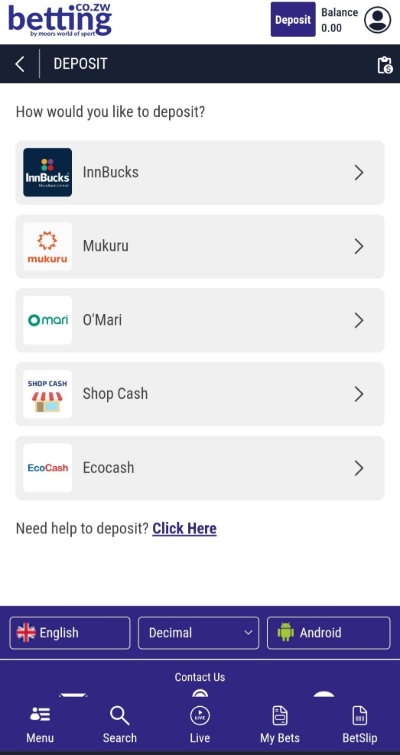
- Log in and tap the blue Deposit button next to your balance.
- Choose EcoCash.
- Enter the amount and tap Deposit Now.
- Enter your EcoCash PIN in the message on your phone and tap Send.
Example: You deposit $5. Your phone asks for your EcoCash PIN, you enter it, and the $5 appears in your MWOS balance within seconds.
How to deposit with InnBucks
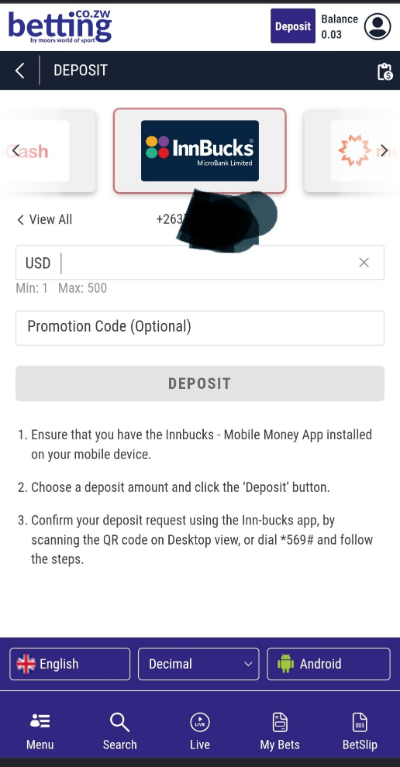
- Tap Deposit and choose InnBucks.
- Check the number, enter between $1 and $500 and tap Deposit Now.
- Confirm in the InnBucks app with your 6-digit PIN, manually, or by scanning the QR code.
Example: To deposit $50, keep at least $51.63 in InnBucks. The 3.25% InnBucks fee on $50 is $1.63.
How to withdraw from MWOS
- Open your account and choose Withdraw.
- Choose EcoCash, InnBucks or a shop payout.
- Enter the amount and confirm the number is in your name.
Some advice: Tap Deposit Now only once. Pressing it twice can confuse the payment and delay your balance.
Deposit not showing? What to do
| What happens | Why | What to do |
|---|---|---|
| EcoCash debited, MWOS balance unchanged | Network delay | Refresh, then send support the EcoCash reference |
| InnBucks deposit blocked | Above $500 or the 3.25% fee isn’t covered | Deposit $500 or less and keep extra for the fee |
| Deposit failed message | Number not registered on EcoCash | Use the number your EcoCash wallet is registered to |
MWOS gives new players a 100% first deposit bonus up to $500 as a free bet, or up to 100 Aviator Free Flights. See our MWOS bonus guide and the MWOS EcoCash and InnBucks walkthroughs.
FAQs
📲 Do I need an MWOS merchant code to deposit with EcoCash?
No. There’s no USSD code to dial and no merchant number to type in. Choose EcoCash in the MWOS cashier, enter the amount and tap Deposit Now, and a payment prompt pops up on your phone. Enter your 4-digit EcoCash PIN, tap Send, and the money usually shows in your balance within seconds.
💳 What is the InnBucks deposit limit at MWOS?
You can deposit between $1 and $500 at a time. Keep in mind that InnBucks charges its own 3.25% fee on top, so your wallet needs a bit more than the amount you want in MWOS. To deposit the full $500, for example, you’d need at least $516.25 in InnBucks. If the fee isn’t covered, the deposit gets blocked.
🧾 Does MWOS charge deposit fees?
MWOS itself doesn’t charge anything to deposit. The fee to watch for is InnBucks’ own 3.25%, and that comes out of your InnBucks wallet rather than your MWOS balance. Deposit $50 and your MWOS balance goes up by the full $50, while $51.63 leaves InnBucks.
⏳ My EcoCash was debited but my MWOS balance didn’t change. What should I do?
Don’t deposit again. It’s usually just a network delay, so refresh the site or app first. If the money still hasn’t arrived, contact MWOS support with the EcoCash reference, the amount and roughly when you paid, and they can trace it.
It also helps to tap Deposit Now only once. A double tap can confuse the payment and slow things down.
🏪 Can I deposit and withdraw at an MWOS shop?
Yes. MWOS is Zimbabwe’s biggest retail bookmaker, so you can pay in cash or collect money at a branch. When you want to cash out at a shop, open Withdraw and pick a shop payout instead of EcoCash or InnBucks. It’s a good option if you don’t use mobile money.