Spin City is built for quick mobile payments. You can deposit from $1 with EcoCash or InnBucks, Spin City doesn’t charge fees, and EcoCash withdrawals are paid within minutes.
Spin City payment methods at a glance
| Method | Deposit | Withdraw | Good to know |
|---|---|---|---|
| EcoCash | $1 to $1,000 | Yes, within minutes | Approve with your EcoCash PIN |
| InnBucks | From $1 | Yes | Approve in the InnBucks app |
| Payment code | From $1 | Deposits only | Pay with a code in your wallet app |
Some advice: Spin City has a $1,000 total daily withdrawal limit. Large wins are paid over more than one day.
How to deposit with EcoCash
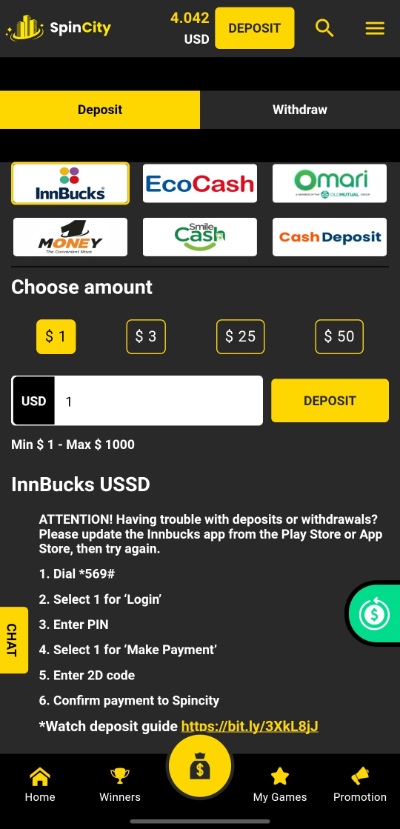
- Log in, open the menu at the top right and tap Deposit Funds.
- Choose EcoCash.
- Enter the amount and tap Deposit Now.
- Enter your EcoCash PIN on your phone. You also get an SMS confirming the payment.
Example: You deposit $1. After you enter your PIN and refresh the page, the $1 is in your balance, and it qualifies for the welcome Free Flights on Avrika.
How to deposit with InnBucks
- Tap Deposit Funds and choose InnBucks.
- Enter the amount.
- Approve the payment in the InnBucks app.
Our Spin City InnBucks guide shows every screen.
How to withdraw from Spin City
- Open the menu and choose Withdraw.
- Choose EcoCash or InnBucks and enter the amount.
- Check the number is yours and confirm.
Example: You win $1,400. You can withdraw $1,000 today and the remaining $400 tomorrow, because of the $1,000 daily limit.
Deposit not showing? What to do
| What happens | Why | What to do |
|---|---|---|
| EcoCash unavailable | EcoCash service is down | Wait until it’s back, then try again |
| Deposit rejected | Below $1 or above $1,000 | Stay between $1 and $1,000 |
| Payment code expired | It wasn’t used in time | Make a new code from Deposit Funds |
| Money left your wallet but no credit | Delay | Send support the payment reference |
New players get 10 Free Flights on Avrika after a first deposit of $1 or more. See our Spin City bonus guide and EcoCash deposit walkthrough.
FAQs
🧾 Does Spin City charge deposit fees?
No. Spin City doesn’t charge you anything to deposit or withdraw. If you’re unsure whether your wallet provider adds its own charge, check your EcoCash or InnBucks tariff before you pay.
⚡ How fast are EcoCash withdrawals?
They’re paid within minutes. Once you confirm the request, the money goes to the EcoCash wallet on your account, so make sure the number on the withdrawal screen is yours before you tap confirm.
📊 Is there a withdrawal limit?
Yes, $1,000 a day in total. Anything above that is paid over more than one day. If you win $1,400, for example, you can take $1,000 out today and the remaining $400 tomorrow.
🔢 What is a Spin City payment code?
It’s a way to deposit by paying a code from your wallet app instead of approving a PIN prompt. You create the code under Deposit Funds, then pay it in your wallet. Codes only work for deposits, and they expire if you don’t use them in time. If yours has run out, simply make a new one.
⏳ The money left my wallet but didn’t reach Spin City. What now?
It’s usually a short delay, so refresh the page after a few minutes. If the balance still hasn’t changed, send Spin City support the payment reference and they can trace it. When EcoCash itself is down, it’s better to wait until the service is back than to keep retrying.