Spin City registration has three short stages on one screen: Register, Verify and Congrats. You only need your phone number and a password. Spin City sends a one-time code (OTP) to confirm the number, and then you can deposit and play.
New players who deposit $1 or more get 10 Free Flights on the Avrika crash game. Here’s each step on a phone, with an example.
How to register at Spin City
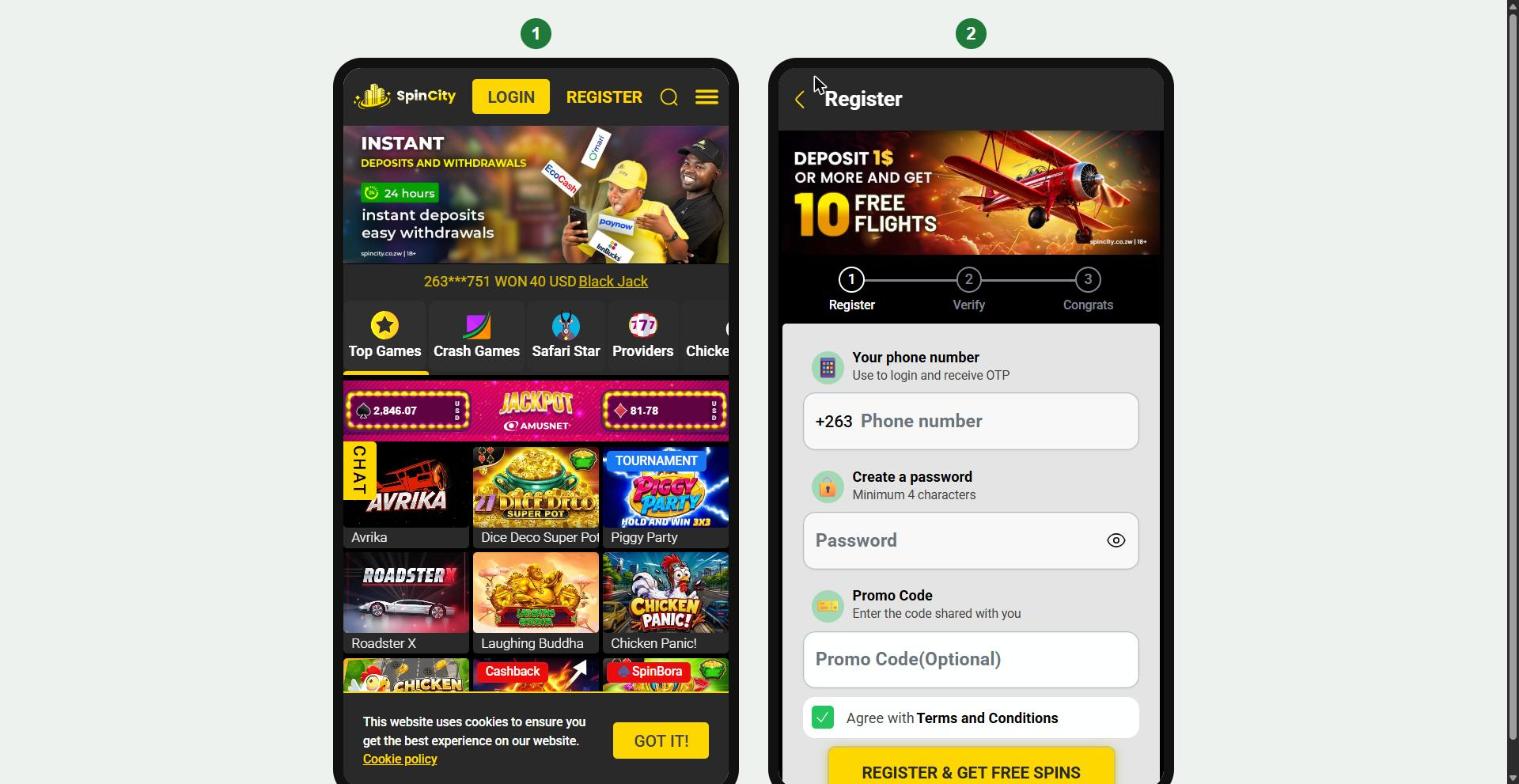
- Open spincity.co.zw and tap REGISTER at the top.
- In Your phone number, type your number after +263, without the first 0. Spin City uses this number for login and for the OTP.
- Create a password. The form asks for at least 4 characters, but a longer one is safer.
- Leave Promo Code empty unless you have one. It’s optional.
- Check that Agree with Terms and Conditions is ticked, then tap REGISTER & GET FREE SPINS.
Example: Your number is 0719 876 543. After +263, type 719876543. A password like Harare719! is easy to remember and much harder to guess than four characters.
Verify your phone number
- Spin City sends an OTP code to your phone.
- Enter it on the Verify step.
- The Congrats screen confirms your account is open.
If the code doesn’t arrive, check the number you typed and that your phone has signal. Use only the newest code if you ask for another one.
Some advice: Spin City is licensed by the Lotteries and Gaming Board of Zimbabwe, licence number 9547860, shown at the bottom of every page.
Common Spin City sign-up problems
| What happens | Why | What to do |
|---|---|---|
| Number rejected | You typed the 0 or the 263 again | Type only the 9 digits after +263 |
| No OTP code | Wrong number or no signal | Check the number and wait for the newest code |
| “Number already registered” | You opened an account before | Log in or reset your password instead |
| Register button doesn’t work | The terms box isn’t ticked | Tick Agree with Terms and Conditions |
Already registered? Our Spin City login guide shows how to sign in and reset your password.
After you register: deposit and claim your Free Flights
Deposit $1 or more to get 10 Free Flights on Avrika. Spin City also runs daily Aviator Rain, slot tournaments and a weekly Jackpot Race. See our Spin City bonus guide for every offer.
Spin City deposits and withdrawals work with EcoCash, InnBucks and other local wallets. Follow our Spin City EcoCash guide or InnBucks guide for your first payment.
Some advice: Never share your password or OTP code, even with someone who says they work for Spin City.
FAQs
What do I need to register at Spin City?
Just your Zimbabwean phone number and a password.
Do I need a promo code?
No. The promo code box is optional.
How do I verify my account?
Enter the OTP code Spin City sends to your phone on the Verify step.
What welcome offer do new players get?
Deposit $1 or more to get 10 Free Flights on Avrika.