You log in to LuckyBets with your phone number and password. The +263 code is already selected, so you only type the rest of your number. If you forget your password, LuckyBets texts a 5-digit security code to your phone so you can set a new one.
Below, each step is shown on a phone, with an example of exactly what to type.
How to log in to LuckyBets on your phone
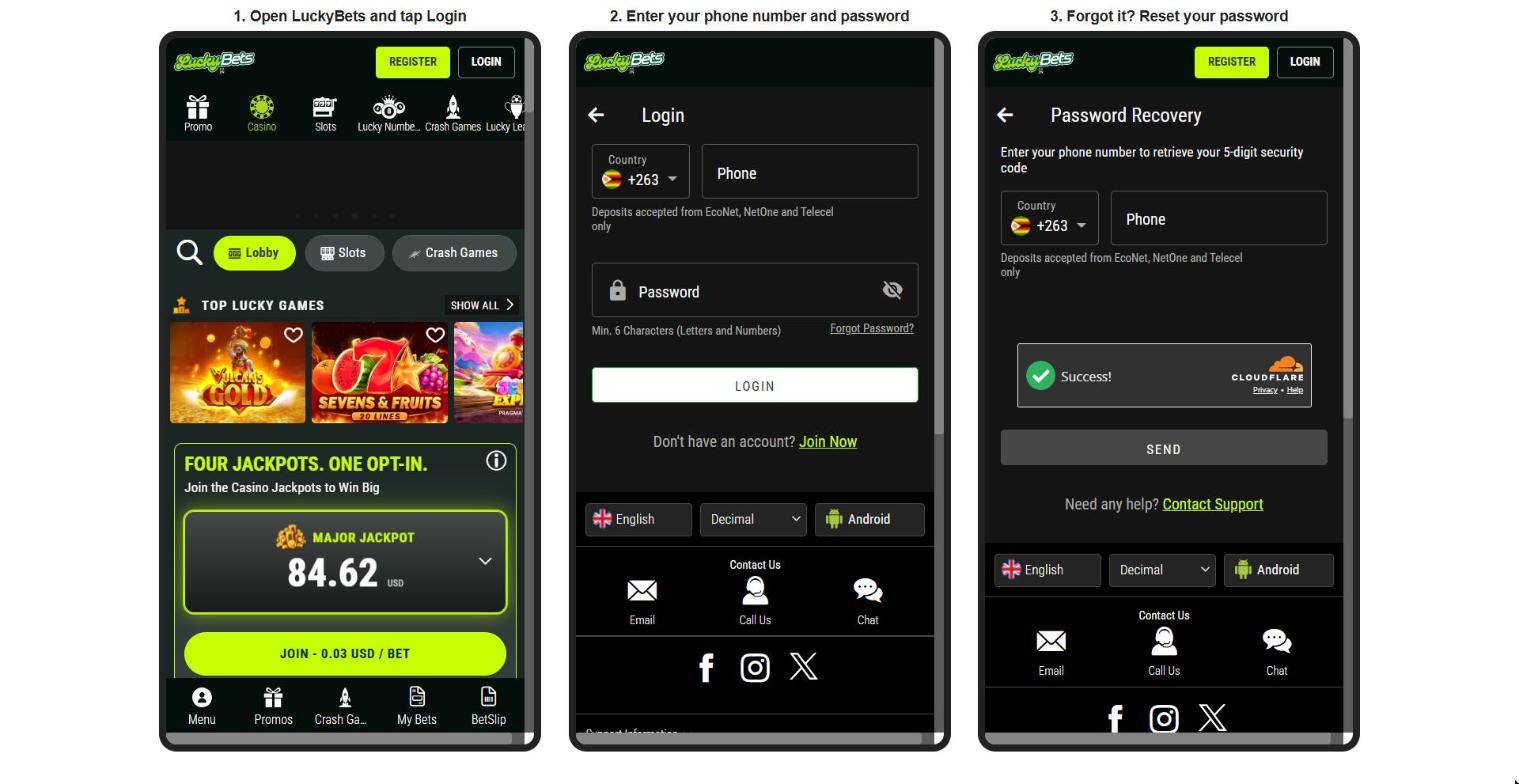
- Open luckybets.co.zw in your phone’s browser and tap LOGIN at the top right.
- Leave the country as +263 and type your number in the Phone box, without the first 0.
- Type your password. It has at least 6 characters, mixing letters and numbers. Tap the eye icon to check what you typed.
- Tap LOGIN.
Example: Your number is 0782 345 678. In the Phone box, after +263, you type 782345678.
Some advice: LuckyBets accepts deposits from Econet, NetOne and Telecel numbers. Register and log in with the number you’ll use for EcoCash, OneMoney or Telecash, so payments and your account stay linked.
How to reset your LuckyBets password
- On the login form, tap Forgot Password? under the password box.
- Enter your phone number, again without the first 0.
- Wait for the security check to show “Success”, then tap SEND.
- LuckyBets sends a 5-digit security code to your phone. Enter it and choose a new password.
Use only the newest code. If you tap SEND more than once, wait for the last SMS before typing it in.
Example: You replaced your SIM and the old number is gone. The code can’t reach you, so tap Contact Support on the recovery screen and ask LuckyBets to move your account to your new number.
Common LuckyBets login problems
| What happens | Why | What to do |
|---|---|---|
| Login rejected | The number has an extra 0, or a capital letter is wrong in the password | Type the number without 0 after +263 and check Caps Lock |
| The 5-digit code doesn’t arrive | Wrong number, no signal, or an old code | Check the number, wait for the latest SMS and use only that code |
| Password not accepted when you set it | It’s shorter than 6 characters or has no numbers | Use at least 6 characters with both letters and numbers |
| You’re logged in but can’t withdraw | LuckyBets needs to verify your ID | Upload your ID in your account, as LuckyBets’ KYC policy asks |
For more help, see our betting account help guide.
After you log in: claim your welcome offer
New players get up to 80 Aviator Free Flights after a first deposit and qualifying Aviator play, and LuckyBets runs weekly sports free bets plus two free prediction games, Lucky6 and LuckyGoals. Our LuckyBets bonus guide explains how each one works.
How to contact LuckyBets support
The login page has Email, Call Us and Chat buttons at the bottom. Say what you were doing, the error you saw and roughly when it happened.
Some advice: Never share your password, the 5-digit code or your mobile money PIN, even with someone who says they work for LuckyBets.
FAQs
Do I log in with my phone number or a username?
With your phone number. LuckyBets’ login form asks for your number and password.
How long is the reset code?
Five digits, sent by SMS to your registered number.
What should my password look like?
At least 6 characters, using both letters and numbers.
Which networks does LuckyBets accept?
The login page says deposits are accepted from Econet, NetOne and Telecel numbers.