Most account problems at Zimbabwean betting sites come down to a handful of small things: a phone number typed in the wrong format, a code that didn’t arrive, or a password reset sent to an old SIM. This guide takes each problem one at a time, explains why it happens in plain terms, and shows you what to do next.
If you already know your bookmaker, jump straight to its own guide in the table below. If you’re stuck on a specific problem, use the problem list underneath it.
Find your bookmaker’s guide
| Bookmaker | Open a new account | Log in or recover your account |
|---|---|---|
| AfricaBet | AfricaBet registration | AfricaBet login |
| MWOS | MWOS registration | MWOS login |
| LuckyBets | LuckyBets registration | LuckyBets login |
| Premier Bet | Premier Bet registration | Premier Bet login |
| Spin City | Spin City registration | Spin City login |
| BolaBet | BolaBet registration | BolaBet login |
| Streambet | Streambet registration | Streambet login |
| Zanzibet | Zanzibet registration | Zanzibet login |
| bet247 | bet247 registration | bet247 login |
| Bezbets | Bezbets registration | Bezbets login |
| ShashaBet | ShashaBet registration | ShashaBet login |
| LinBets | Closed | Old LinBets accounts |
Which problem do you have?
| What you see | Go to |
|---|---|
| The site says your phone number is invalid | Phone number not accepted |
| You asked for a code but nothing arrived | Code not arriving |
| The site says your username or password is wrong | Login details rejected |
| You can’t remember your password | Resetting your password |
| You changed SIM or lost your phone | New or lost phone number |
| The site or app won’t open | Site or app not loading |
| You can log in but can’t withdraw or bet | Account restricted or not verified |
| Your bookmaker has closed | When a bookmaker closes |
Before you register: what you need
Every Zimbabwean bookmaker asks for roughly the same things. Having them ready saves you from stopping halfway through the form.
- Your own phone number, on a SIM you will keep. Most sites send a code to it, and it becomes the main way to recover your account.
- Your real name and date of birth, exactly as they appear on your ID. You must be 18 or older.
- Your national ID number. Some sites, such as MWOS, ask for it on the sign-up form.
- A password you can remember, but that you don’t use for your email or mobile money.
- Access to your email, if the site sends an activation link instead of an SMS.
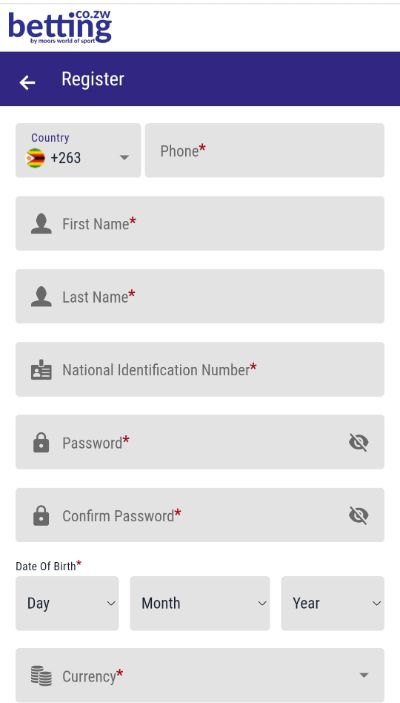
Some advice: Use the same name spelling you have on your ID. If you register as “Tino” but your ID says “Tinotenda”, the withdrawal check later can fail and you’ll have to contact support to fix it.
Problem 1: Your phone number is not accepted
This is the most common sign-up and login problem. It usually isn’t your number that’s wrong, but the way it’s typed.
Why it happens
Zimbabwean numbers are normally written starting with 0, like 0771 234 567. Online forms often already add the country code (+263) for you. When you then type the 0 as well, the site sees “+263 0771…”, which is one digit too long.
What to do
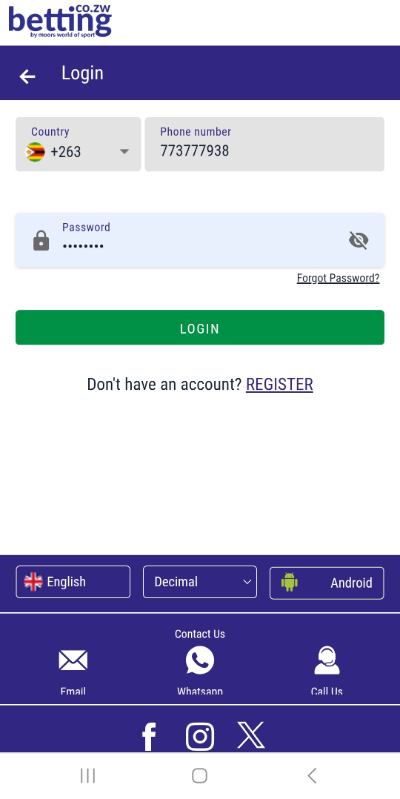
- If the form has a separate +263 box, leave out the first 0. Type 771234567.
- If there is no country code box and the site asks for your number with the country code, type 263771234567, with no + and no spaces.
- Check you haven’t added or dropped a digit. A Zimbabwean mobile number has nine digits after the 263.

Example: Your Econet number is 0771 234 567. On MWOS, which has a +263 box, you type 771234567. On a site that asks for one long number, you type 263771234567.
Problem 2: Your verification code doesn’t arrive
Most sites send a short code (often five or six digits) by SMS to prove the phone is yours. You can’t finish signing up or resetting a password without it.

Why it happens
- The number was typed wrongly, so the code went to someone else (see Problem 1).
- Your phone has weak signal, or the SIM is in the second slot of a dual-SIM phone and that line is switched off.
- You asked for several codes, and you’re typing an old one. Each new request usually cancels the last.
What to do
- Look at the number shown on the code screen. If it’s wrong, go back and fix it.
- Check that the registered SIM has signal and can receive normal SMS.
- Wait for the countdown to finish before tapping “Send a new code”.
- Type only the newest code, in the same window that asked for it. Codes often expire within a few minutes.
Example: You tap “Send code” three times. Three messages arrive a minute apart. Only the last one will work.
Some sites, such as Zanzibet, send an activation link by email instead. Open the email, tap the activation button, then log in. If it isn’t in your inbox, check the spam or promotions folder.

Problem 3: The site says your login details are wrong
If you’re sure your password is right, the problem is often the first box: the username, phone or email.

What to check
- Which detail the box asks for. If you signed up with a username, typing your email may not work, even with the correct password.
- The phone number format (see Problem 1).
- Capital letters. Passwords are case-sensitive, so “Harare2024” and “harare2024” are different. Check that Caps Lock is off.
- Autofill. Your browser may be filling in an old password. Clear the box and type it yourself.
- The right website. Make sure you’re on the bookmaker’s Zimbabwe site. A sister site in another country won’t recognise your account.
If it still fails after two or three tries, stop and reset the password. Too many wrong attempts can lock the account for a while.
Problem 4: Resetting a forgotten password
Every site has a “Forgot password?” link on the login screen. It sends a code or link to the phone number or email on your account.
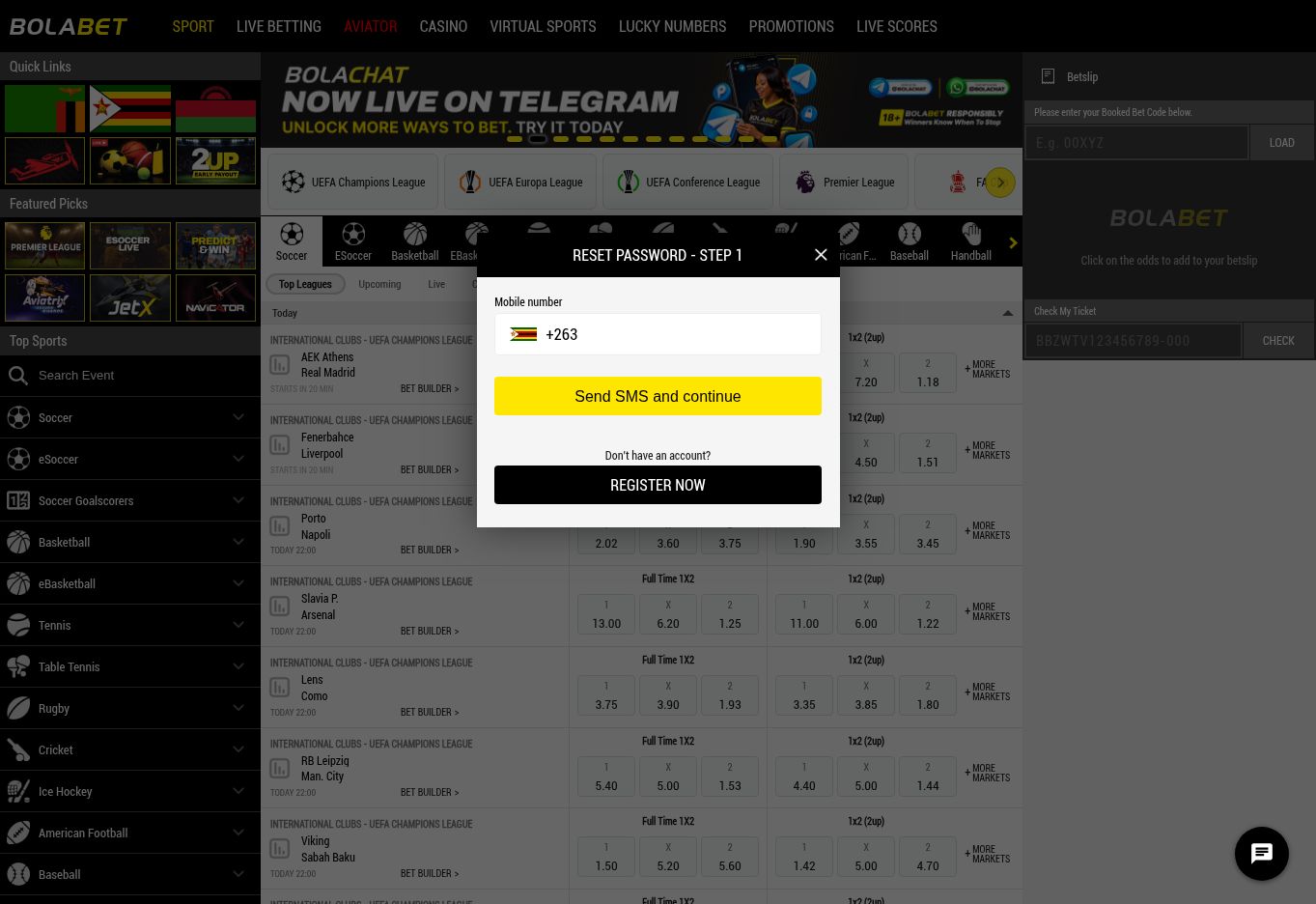
- Tap Forgot password? on the login screen.
- Enter the phone number or email you registered with.
- Type the code you receive, or open the reset link.
- Choose a new password and log in with it straight away.
Example: On MWOS, you enter your phone number and receive a 5-digit code. You type the code into the next screen, then set your new password.
Some advice: A password reset only fixes a forgotten password. It won’t lift an ID check or release a pending withdrawal. Those are separate steps, covered below.
Problem 5: You have a new or lost phone number
If your account is linked to an old SIM, you won’t receive login or reset codes. Your account and balance are still there; only the contact number is out of date.
What to do
- If you can still log in, look for an option to update your phone number in your profile.
- If you can’t log in, contact the bookmaker’s support and ask them to change the registered number. They will usually ask for your name, date of birth, ID number and old number to prove the account is yours.
- Don’t open a new account with the new number. Most bookmakers allow one account per person, and a second account can be blocked, leaving your old balance stuck.
Example: You replaced your SIM after losing your phone. Your password still works, but the reset code goes to the old number. Contact support to move the account to your new number instead of signing up again.
Problem 6: The site or app won’t load
- Check your connection. Open another website. If that also fails, switch between Wi-Fi and mobile data, or move closer to your router.
- Update your browser. Old versions of Chrome may not display the form properly.
- Try the mobile website. If the app keeps crashing, log in through the browser instead. Our Zimbabwe betting apps guide lists each bookmaker’s official app.
- Wait and try again. Sites sometimes go offline for maintenance, especially late at night. If your details and internet are fine, try again in an hour.
Some advice: Only download apps from the bookmaker’s own website or an official app store. An app sent to you on WhatsApp could steal your login details.
Problem 7: You can log in, but your account is restricted
Sometimes you can see your balance but can’t withdraw, or bets are blocked. That usually means the bookmaker needs something from you, not that your password is wrong.
| What you see | What it usually means | What to do |
|---|---|---|
| Withdrawal blocked, “verify your account” message | The bookmaker needs to confirm who you are | Upload your ID and proof of address in your profile |
| Account suspended or blocked | A rule may have been broken, such as a second account | Contact support and ask for the reason |
| Self-exclusion message | You asked for a break from betting | Keep the break; contact support only for account questions |
Verification is normal at licensed bookmakers. AfricaBet, for example, asks every player for a copy of their national ID, passport or driver’s licence plus proof of residence before the first withdrawal.

Some advice: If you have self-excluded, opening an account at another bookmaker won’t solve the underlying problem. Keep the break in place and speak to someone you trust if betting feels hard to control.
When a bookmaker closes
No login guide can reopen a closed platform. LinBets, for example, shut its Zimbabwe site and posted a notice that balances would be refunded.
- Save a screenshot of the closure notice and your last balance.
- Stop making deposits to the closed site.
- Follow the refund instructions in the official notice.
Our LinBets account guide explains what to do if you had money there.
How to ask support for help
A short, clear message gets fixed faster. Say what you were trying to do, what happened, and the last step that worked.
Example: “I tried to reset my password at 08:20 today. I entered my number ending 4567, but no code arrived after three tries. My username is tino_m.”
- Include the exact error message if there is one.
- For a payment problem, add the date, amount and transaction reference.
- Crop out balances and personal details from screenshots unless support asks for them.
Some advice: Never share your password, a one-time code or your mobile money PIN, even with someone who says they work for the bookmaker. Real support staff never need them.
Before your first deposit
Once you can log in, check that your name and phone number are correct in your profile. Then compare payment options in our payment methods guide. The cashier can list different methods for deposits and withdrawals, so check both. If you’re still choosing a site, our Zimbabwe betting sites directory compares them.
Frequently asked questions
Can I open a second account if I forget my password?
No. Reset the password on your existing account instead. Most bookmakers allow only one account per person, and a duplicate can be blocked along with your original balance.
Why does the site say my number is already registered?
You, or someone using that SIM before you, may already have an account. Try resetting the password with that number. If it isn’t your account, contact support.
What if I entered my name wrongly?
Contact support before you deposit or upload documents. A name that doesn’t match your ID will cause problems at withdrawal.
Do I need to verify my account to bet?
At most sites you can bet once your phone number is confirmed, but you’ll need to verify your identity before your first withdrawal.
How long does a reset code last?
Usually only a few minutes. If it expires, request a new one and use only the newest code.